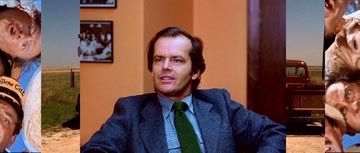
I'm about to seriously nerd out here...
Forgive me if any of this is patronising but I believe you've asked a question which hasn't been answered yet (why do you still have black bars when watching a widescreen film on your widescreen tv) and this is the best way to answer it.
Very generally....
Films are shot in one of three aspect ratios.
4:3 (your basic, square tv shape) --
1.85:1 (which is the same as 16:9 and the standard shape of a widescreen tv) --
and 2.35:1 (for a screen that is 2.35 times wide as it is tall) --
If you lay all these films on top of each other, it looks like this --
This is just so you can see the differences. They're all the same height but the 2.35 is the widest followed by the 1.85.
This creates problems when putting things onto DVD.
In the old days, when we all had tvs that were square, 4:3, the 4:3 films fit perfectly because they were the exact same shape as your TV --
But 1.85:1 (16:9) and 2.35:1 films wouldn't. They either had to be panned and scanned, whereby the height of the image was kept but the sides were cut off --
or they had to be presented in their original aspect ratio with blacks bars --
Things changed when we got 16:9 or widescreen tvs. Films that were shot in 1.85 or 16:9 now fit our tvs perfectly. (an increasing number of tv programs are also shot in this ratio now.)
And it was the old, 4:3 films which now got the black bars because their images weren't long enough to fit the wider screens.
(also known as YDS, or, Youtube Douchebaggery Syndrome)
But... this
still left a problem because a great deal of films are shot in 2.35:1 which is still too wide even for widescreen TVs. Since no company makes a 2.35:1 shaped TV, the only solution is to present the image with black bars at the top and bottom.
And that, I think, is the answer to your question. You're watching a 2.35:1 film on a 1.85:1/16x9 widescreen TV. Check the back of the DVD box, it'll have a section that says something like, "2.35:1 anamorphic widescreen."
It may seem wrong with black bars at the top and bottom of the image but this is the full image that you're supposed to see. You're not really missing anything. If you don't like the black bars, there are probably settings on your tv that you can use to stretch the image to completely fill the screen though bear in mind this will cause some loss in image quality.
There are all kinds of further complications to add to this such as the Super 35 film format which works differently for pan and scan but unless you're watching a James Cameron film, it's not likely to be a problem.

My advice; buy a projector so you can watch in whatever damn format you like.




 watching movies on full screen. Dizzy became very annoying, and very annoying turned into my almost obsessive need to buy only widescreen DVD's.