annoying dotted line. [SOLVED]

robertbevan

practical experience, FTW
Super Member
Registered
Joined
Sep 16, 2011
Messages
706
Reaction score
70
Location
incheon, south korea.
way back in chapter eleven, i decided i wanted to section off a couple of paragraphs from the rest of my story, and i did so with a line of asterisks. word decided that what i really wanted was a line of square dots running across the whole page. that was fine by me.

later, i decided that i wanted to cut out that little section entirely, but word was having none of it. i can't get rid of that stupid dotted line.

and now, having finished a revision, i wanted to put all of my chapters together to see how the whole thing looked, and get a word count on it (i'd saved all of my chapters as individual files before), at the end of every chapter after eleven, i've got that same stupid dotted line haunting the bottom of the page, and there's nothing i can do to get rid of it.


to further complicate things, i'm using a korean version of word, and i don't know what most of the buttons on the toolbar do. but if anyone knows what i'm talking about and how to fix it, i can get my wife to help me with the buttons.

thanks.
 
Last edited by a moderator:

zanzjan

killin' all teh werds
Kind Benefactor
VPX
VPXI
Super Member
Registered
Joined
Feb 5, 2010
Messages
9,748
Reaction score
3,256
Location
home home homityhomehome
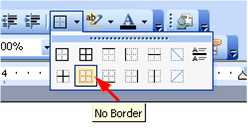
No idea if this is it, but if you highlight that area and go to borders and select "no border", does that make it go away?

ETA: ah, yes, that may indeed be it
 

robertbevan

practical experience, FTW
Super Member
Registered
Joined
Sep 16, 2011
Messages
706
Reaction score
70
Location
incheon, south korea.
I'm not sure which version of Word you have.

Since you can already see the dotted line (if not you could use the Show/Hide tool).
-Select the line,
-Then hit Delete (key)

oh ho ho ho ho...

would that it were so easy. it can't be highlighted.

also, i've tried to backspace over it from the beginning of the next chapter, and that gets rid of it, until i hit "enter". then it pops right back down there again.
 

robertbevan

practical experience, FTW
Super Member
Registered
Joined
Sep 16, 2011
Messages
706
Reaction score
70
Location
incheon, south korea.
No idea if this is it, but if you highlight that area and go to borders and select "no border", does that make it go away?

ETA: ah, yes, that may indeed be it

oh hey zanzjan...

i didn't see your post at first. it looks like you found exactly what's wrong. thanks a whole bunch.

now i'll just wait for the missus to get home so i can ask her what the korean button for "borders" is.

cheers!
 

zanzjan

killin' all teh werds
Kind Benefactor
VPX
VPXI
Super Member
Registered
Joined
Feb 5, 2010
Messages
9,748
Reaction score
3,256
Location
home home homityhomehome
now i'll just wait for the missus to get home so i can ask her what the korean button for "borders" is.

I don't know if this helps, but this is what the button looks like in Office 2003:

noborder.gif
 

Billtrumpet25

Super Member
Registered
Joined
Mar 8, 2012
Messages
1,299
Reaction score
201
Age
32
Location
Phoenix, AZ
Ah, man...leave it to me to join the party after everyone has gone home.

Well, glad it worked out for you. MW can be a pain in the rear, regardless of what version you use.

I'll continue my one man party now. :PartySmil

;)
 

alleycat

Still around
Kind Benefactor
Super Member
Registered
Joined
Apr 18, 2005
Messages
72,919
Reaction score
12,277
Location
Tennessee
I'm going to edit your title, Robert, to show the problem has been solved.

BTW, I misunderstood your question. At first I thought you had put in an extra section break you wanted to get rid of. Sometimes they can seem hard to get rid of if someone has never deleted one before. It's just slightly tricky.