


- Joined
- Mar 13, 2005
- Messages
- 2,324
- Reaction score
- 750
- Age
- 71
[feel free to sticky if deemed helpful]
So you didn't follow my advice on how to buy a new PC because that $399.00 price tag was just too darn tempting. And now, after you spent the better part of a day uninstalling trial software and redundant security suites and despite your vigilance, someone in the family (or more likely one of the kids' [no longer] friends) clicked on the wrong link.
Your security software gives you the bad news: somehow, a malicious rootkit has invaded your machine and the only remedy is the Big Three:
1. Backup your data.
2. Format the hard drive.
3. Reinstall Windows.
Feeling proud of your prescience, you blithely slide in that system recovery DVD you burned when you first fired up the PC, wait for it to work its magic and . . .
You cry. Yes, Windows is back, but so is all that trialware and bloatware you worked so hard to get rid of.
Are you out of luck? Maybe not. If you can borrow a Windows 7 installation DVD for the edition that was originally installed on your PC, you can format the hard drive, install Windows 7 and use the product key on the Certificate of Authenticity (COA) label to activate it.
The only catch: It has to be the same edition (Starter, Home Basic, Home Premium, Professional or Ultimate). You can't use the product key from Ultimate with the Professional DVD.
Well, darn! That DVD you borrowed from the guy in the IT department says Professional and the COA label on your laptop says Home Premium! That's why you can't get past the "Please enter the product key" screen.
If you take your PC to Best Buy or call in Geek Squad, they'll use a special all-in-one DVD to install Windows. The good news: you can legally make your own such DVD and reinstall Windows yourself. You can even make a 64-bit DVD and activate the installation with the product key from a 32-bit installation on the same machine. The new installation will wipe out the old one and that keeps things legal.
You'll need a blank DVD, access to a computer with a DVD burner (also called a SuperDrive, NOT a Combo drive) and DVD burning software (included in Windows Vista and Windows 7), a fast internet connection (you'll be downloading at least 3GB), and a simple utility that lets you access all of the versions of Windows 7.
Follow the steps here:
http://tinyurl.com/legalwindows7download
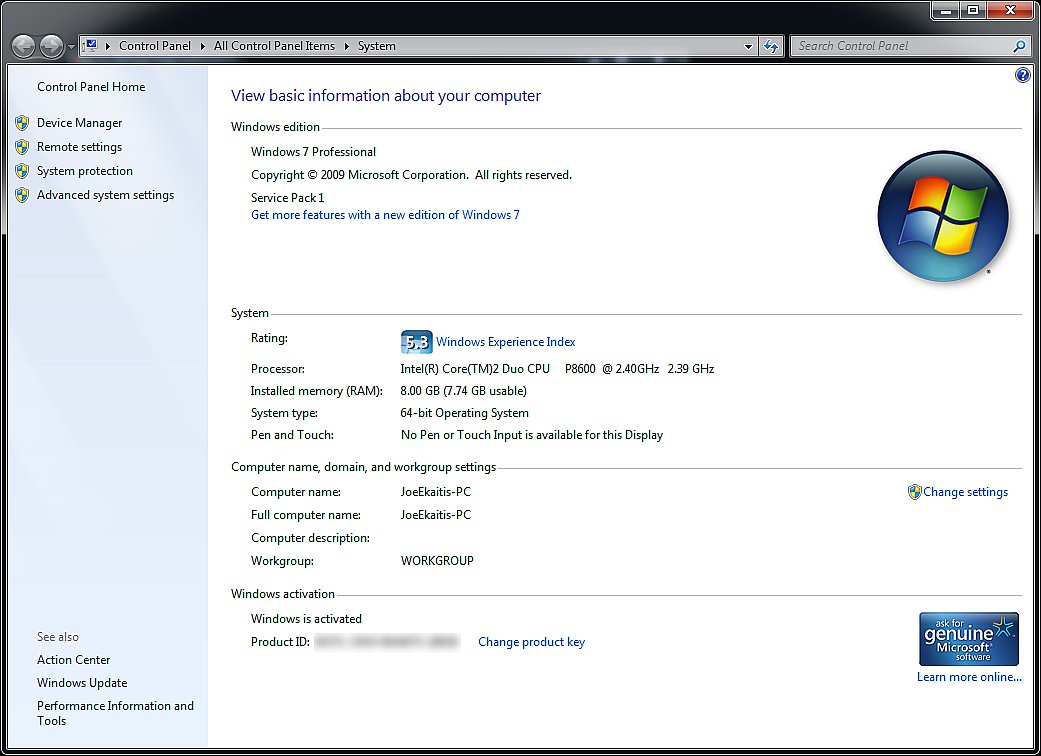
I made a 64-bit Windows 7 DVD and installed Windows 7 Professional on a MacBook Pro using Boot Camp. When prompted, I entered the product key from a 32-bit OEM DVD bought from Amazon.com. The operating system activated without a hitch and passes Genuine Windows Validation. If Microsoft's security servers had detected any monkey business, activation would have failed.
Click the image to see it full size.

So you didn't follow my advice on how to buy a new PC because that $399.00 price tag was just too darn tempting. And now, after you spent the better part of a day uninstalling trial software and redundant security suites and despite your vigilance, someone in the family (or more likely one of the kids' [no longer] friends) clicked on the wrong link.
Your security software gives you the bad news: somehow, a malicious rootkit has invaded your machine and the only remedy is the Big Three:
1. Backup your data.
2. Format the hard drive.
3. Reinstall Windows.
Feeling proud of your prescience, you blithely slide in that system recovery DVD you burned when you first fired up the PC, wait for it to work its magic and . . .
You cry. Yes, Windows is back, but so is all that trialware and bloatware you worked so hard to get rid of.
Are you out of luck? Maybe not. If you can borrow a Windows 7 installation DVD for the edition that was originally installed on your PC, you can format the hard drive, install Windows 7 and use the product key on the Certificate of Authenticity (COA) label to activate it.
The only catch: It has to be the same edition (Starter, Home Basic, Home Premium, Professional or Ultimate). You can't use the product key from Ultimate with the Professional DVD.
Well, darn! That DVD you borrowed from the guy in the IT department says Professional and the COA label on your laptop says Home Premium! That's why you can't get past the "Please enter the product key" screen.
If you take your PC to Best Buy or call in Geek Squad, they'll use a special all-in-one DVD to install Windows. The good news: you can legally make your own such DVD and reinstall Windows yourself. You can even make a 64-bit DVD and activate the installation with the product key from a 32-bit installation on the same machine. The new installation will wipe out the old one and that keeps things legal.
You'll need a blank DVD, access to a computer with a DVD burner (also called a SuperDrive, NOT a Combo drive) and DVD burning software (included in Windows Vista and Windows 7), a fast internet connection (you'll be downloading at least 3GB), and a simple utility that lets you access all of the versions of Windows 7.
Follow the steps here:
http://tinyurl.com/legalwindows7download
I made a 64-bit Windows 7 DVD and installed Windows 7 Professional on a MacBook Pro using Boot Camp. When prompted, I entered the product key from a 32-bit OEM DVD bought from Amazon.com. The operating system activated without a hitch and passes Genuine Windows Validation. If Microsoft's security servers had detected any monkey business, activation would have failed.
Click the image to see it full size.
Last edited: